Sunday, October 16, 2022

Amateur Radio Klub Nuus vir 22 - 29 Oktober 2022


Die nuwe Eden Radio Klub beoog om Saterdag 22 Oktober 2022 ‘n veldstasie op te rig vanaf die George Botaniese Tuine. Die stasie sal aktief wees vanaf 08:00-14:00. Tydens ‘n vorige veldstasie vanaf die Tuine het verskeie radio amateurs en lede van die publiek die stasie besoek. Die publiek en radio amateurs word versoek om die stasie te besoek vir verdere inligting rondom amateur radio of kontak Corne ZS1COR by edenradioclub@gmail.com

Die Bo-Karoo Amateur Radio Klub hou hulle AJV op Saterdag 29 Oktober by die Sandgat Karavaanpark naby die dorp Vanderkloof, aan die oewer van die Vanderkloofdam. Kontak zs3vdk@webmail.co.za vir meer inligting.

Die Suid-Kaap Amateur Radio Klub beplan 'n veldstasie vanaf 10:00 SAT op Saterdag 29 Oktober by die Oop Park oorkant die Heiderand Mall op die hoek van Seder- en Melkhout strate in Heiderand, Mosselbaai. Die Klub wil bewys dat sy lede van die netwerk af kan funksioneer as daar 'n lang tydperk van beurtkrag of verduistering is, ook om antennas en toerusting te toets. Almal is welkom. Kontak zs1skr@gmail.com vir meer inligting.


Tuesday, October 11, 2022

DIY External 18650 Li-ion Battery Pack for the Yaesu FT817 (Version 2)


In this posting I will describe how I built a cheap Version 2  DIY 18650 Lithium-Ion battery pack for my Yaesu FT-817.  The Version 1 DIY 18650 Lithium-Ion Battery pack is available HERE. 

I decided to go the cheap route by salvaging 6 x cells from a  Samsung Laptop battery pack that was in my junk box. I tested each cell and discarded dead or bad cells. These cells are all Li-Ion batteries. The cell voltage of the batteries I used was in the 4.18v range. So that gave me 12,6V on a 3S pack (2 Parallel, 3 series configuration) which is in the specs of most standard amateur radio transceivers.  The capacity of one cell relates to 2000mAh.  With the current configuration I have more than enough capacity for the FT817 to make several contacts over a much longer period than the previous Version 1 battery pack.

Before connecting the cells in parallel, first, check the individual cell voltages. For paralleling the cells, the voltage of each cell should be near to each other, otherwise, a high amount of current will flow from the cell with a higher voltage to the cell with a lower voltage. This can damage the cells and even result in fire on rare occasions.

If you are using brand new cells, the cell voltage is near 3.5 V to 3.7 V, you can join them together without worrying much. But if you are going to use an old laptop battery, be sure the cell's voltage is nearly the same, otherwise, charge the cells to the same voltage level by using a good Li-Ion Battery Charger.

I used a simple tester to first test each individual battery. However this is not the way to do it but I had it on hand and thus far it has worked for me. (More information on the tester can be found in and earlier post available HERE.)  I charged each cell separately using a one cell charger as shown in the photo. Once all six batteries were charged to within specs I used my old trusted Accucell 6 Turnigy Charger to charge the battery pack. The charger is depicted in the photos below. To prevent a short between the terminals of the batteries I have used self-adhesive insulating rings on the positive terminal side. It is not mandatory but will give extra protection.

We have to assemble the battery to get the desired voltage and capacity. In my case, the voltage requirement is 12.6 V.

The voltage level of a fully charged 18650 battery is 4.2V, to get 12V we have to connect 3 batteries in series (3S). To increase the capacity we have to add such series groups (3S) in parallel. Here I have used two such groups. So our final battery pack configuration is 3S2P.

If you need more backup time, add more parallel groups. In that case, the configuration will be 3S3P, 3S4P, 3S5P... and so on.

Number of batteries required to achieve 3S2P configuration = 3 x 2 = 6

Now we have to arrange the 6 batteries properly for making the electrical connection among them and with the BMS board.

Place the first parallel group of cells (2 nos) positive side up, then place the second parallel group negative side up, and then finally the last parallel group positive side up. For a better understanding, you can look at the images below.

I used plastic 18650 cell holders/spacers to assemble the 6 batteries. The main advantages of using these holders are:

1. You can make a custom pack of any size according to your requirement. It's like solving a puzzle.

2. It provides space between the cells, which allows fresh air to pass and the battery gets cooled easily.

3. It makes your battery pack solid and reliable.

4. It provides safety anti-vibration to your battery pack 

Once I was happy with the outlay I used nickel plates on top of the 2 cells ensuring that it covers cell terminals, and then cut it. Connect the first parallel group negative terminal to the positive terminal of the second group and then the negative terminal of the second group to the positive terminal of the third group.  Unfortunately I do not have a battery spot welder (yet) so I had to revert to using a soldering iron which is not the best idea to make up battery packs.  However I used it and we will have to see how long the batteries will last.

I connected the 3 S BMS as shown in the wiring diagram. The BMS has four soldering pads: B-, B1, B2, and B+. You have to connect the first parallel group negative terminal bus to the B- and positive terminal bus to the B1. Similarly the third parallel group negative terminal bus to the B2 and positive terminal bus to the B+.

You can spot weld the nickel strips to the BMS or solder them to the PCB pad. I preferred to solder the nickel strips to the PCB for a sturdy connection. First, apply soldering flux to the PCB pads and end of the nickel strips. After that tin all the pads by applying a little amount of solder and then solder them together. After connecting all the cells, you can check the battery pack voltage to ensure you have connected it correctly.

 I decided to build this battery pack as simple as possible with very little bells and whistles. Thus far it works flawlessly with the FT817. This pack can also be used for a variety of other power sources. You can either add a power up converter or a down converter for the voltage that you need.

I still have several 18650 batteries in the junk box and will construct another battery bank for my Internet Router and Fiber connection.

The total cost of the project did not exceed +- R75.00 having used salvaged batteries.  The items that made up the total cost was the battery holders, nickel plates, BMS and heat resistant polyimide tape

Once everything was in its place I gave the battery pack a full charge with the Accucell 6 Turnigy Charger.  I charged the pack at 3.0 Amp with 11.1V (S3) as prescribed.  The charge time was about 22 minutes with a charge supply capacity of  1834 and 12.6V reflected on the screen during the charge process.  Unfortunately I did not save the charging data.  This would have been helpful to also analyze the state of the battery pack.  There will always be a next time.  I am contemplating whether  I should cover the battery pack with Battery Sleeve Heat Shrink Tubing for good isolation and safety. 

Finely:   I will test this battery pack with the Yaesu FT817 but might also use in for a back-up  WiFi Router UPS.  Once I have decided I will update this posting. 

(Click on images for larger view) 


Thursday, October 6, 2022

ARISS Contact Scheduled with Argentine Students to be broadcast on the GRHub Network!


ARISS Contact is Scheduled with Students at  Escuela #38 Raul Alfonsin, Esperanza Base, Argentina Argentine Research Station in Hope Bay, Trinity Peninsula, Antarctica

 
October 5, 2022—Amateur Radio on the International Space Station (ARISS) has received schedule confirmation for an ARISS radio contact between astronauts on-board the International Space Station (ISS) and students at the School #38 Raul Alfonsin, located on Esperanza Base, Argentina.  ARISS conducts 60-80 of these special amateur radio contacts each year between students around the globe and crew members with ham radio licenses on-board the ISS.

School #38 Raul Alfonsin was established in 1978 when the first families of the base personnel began to arrive at Base Esperanza, and the mothers of the students served as teachers. In 1997 the school became part of the Ministry of Education of the Province of Tierra del Fuego, Antarctica and the South Atlantic Islands. The Esperanza base is located at Punta Foca in Esperanza Bay on the Trinidad peninsula, about 1,100 kilometers from Ushuaia and about 3,200 from Buenos Aires. The school serves 16 students (school year 2022) with ages ranging from 3 to 21 years.

This will be a telebridge Contact via Amateur Radio and students will take turns asking their questions of Astronaut Kjell Lindgren, amateur radio call sign KO5MOS. Local Covid-19 protocols are adhered to as applicable for each ARISS contact. The downlink frequency for this contact is 145.800 MHZ and may be heard by listeners that are within the ISS-footprint that also encompasses the telebridge station.

The ARISS amateur radio ground station (telebridge station) for this contact is in Aartselaar, Belgium. The amateur radio volunteer team at the ground station will use the callsign ON4ISS, to establish and maintain the ISS connection.
The ARISS radio contact is scheduled for October 7, 2022 at 12:14 pm ART (Esperanza Base)   (15:14:18 UTC, 11:14 am EDT, 10:14 am CDT, 9:14 am MDT, 8:14 am PDT).


 As time allows, students will ask these questions:

1. What does the Earth like from the space?

2. Do you remember your first day in space?  Can you describe your emotions to us?

3. How do you go to the bathroom in the space? How does the space toilet work?

4. What are the most important activities of the day, or a working day?

5.  What do you do in your free time?

6.  How are the daily tasks divided with the rest of the crew?

7. What do you usually have for lunch?  What do you usually eat?

8.  In our Base in Antarctic, we call the power generation plant "the heart of the base".  What would you call the heart of the space station?

9. When are you coming back to the earth?  How are you coming back?

10.  What was the root cause of your decision to be an Astronaut?

11. Which message would you give to the people who dream to be an Astronaut?

12. What are the strangest things that have happened to you during your mission in Space?

13. What happens if someone gets seriously ill, how do you send him back?

14. An Icebreaker ship brought us here, how did you get to the International Station?

15. Have you even been to the Antarctic continent?  Would you like to visit us, sometime?


About ARISS:

Amateur Radio on the International Space Station (ARISS) is a cooperative venture of international amateur radio societies and the space agencies that support the International Space Station (ISS). In the United States, sponsors are the Radio Amateur Satellite Corporation (AMSAT), the American Radio Relay League (ARRL), the ISS National Lab-Space Station Explorers, Amateur Radio Digital Communications (ARDC) and NASA’s Space communications and Navigation program. The primary goal of ARISS is to promote exploration of science, technology, engineering, the arts, and mathematics topics. ARISS does this by organizing scheduled contacts via amateur radio between crew members aboard the ISS and students. Before and during these radio contacts, students, educators, parents, and communities take part in hands-on learning activities tied to space, space technologies, and amateur radio. For more information, see www.ariss.org


Media Contact:

Dave Jordan, AA4KN

ARISS PR


Tuesday, October 4, 2022

THE ANTENNA FARM - By Charles KC6UFM via East Coast Reflector Newsletter


Hello ECR Family, and welcome to The Antenna Farm. This is your friendly Antenna Farmer Charles, KC6UFM.

This time on the Farm, we’re going to have a look at some of the more common RF connectors you will encounter in your time as a ham operator. We’re taking this time because you can have a great antenna, a perfect matching system, and the finest feed line money can buy, but if you can’t hook it all together, you have a pile of junk.

We’re also investing some time here because in all antenna systems, no matter the application, the Holy Grail is to have the lowest possible loss. Connectors are often overlooked by hams, even those with many decades of experience, as a source of loss...we are careful to get low-loss feed line, fret over the loss of our matching networks, spend hours making sure our ground losses are minimized, and then put half a dozen lossy connectors in the system.

The goal in this article is make you aware of the losses inherent in connectors and encourage you to think about that.

There are many different RF connectors available, but only four that are commonly seen in ham radio. Like so many other things, each of these connectors have their advantages and disadvantages. Let’s take a look at these connectors one at a time…


The UHF Connector

This is probably the most common connector that hams will encounter. Pretty much every mobile and base radio out there has a UHF connector for the RF output.

Originally designed by Amphenol in the 1930s, the UHF connector has become so popular that when hams (and professional) operators say “RF Connector,” you can usually assume they mean a UHF type.


There are two variations that you will commonly see:

    1) The SO-239 (see Figure 1) is the female, chassis mount half of the set. This is what you will normally see on the back of your radio. There are several variations for bulkhead mount, pigtail (on a cable) mount, and others, but they are all similar. The female part comes into play because of the small “socket” that the pin from the male half plugs into.

    2) The PL-259 (see Figure 2) is the male half of the set. This is what you will normally see on the end of your coax from the antenna. Again, there are some variations. This is the male half because of the small pin in the center that plugs into the socket on the mating female half. The PL-259 is designed for use with RG-8 class coax (about 0.405” in diameter) and Figure 2 also shows the adapter to be used with small coax like RG-58 (about 0.193” in diameter). There are other adapter sizes available as well.

UHF connectors have two properties that are important to hams:

    1) First, UHF connectors are not waterproof. Any connectors outside must be sealed in some manner to protect them and the cable from the weather.

    2) Second, while designed to offer a nominal impedance of 50 ohms, UHF connectors are not constant-impedance devices. That means that there is no guarantee that the connector will actually be 50 ohms. I have, over the years, measured a good number of UHF connectors and found the real world impedance to be someplace between around 40 ohms up to 70 ohms. To be blunt, you get what you pay for...genuine Amphenol UHF connectors tend to be very close to 50 ohms. Cheaper units will be farther off.

In addition to the PL-259 and SO-239 versions, there are angle adapters (both 90 and 45 degree are common and there is a much harder to find 30 degree model), through-fittings for bulkheads, couplers, barrels, adapters to other connector types, and many others.

The advantage of UHF connectors is that they are fairly inexpensive and fairly easy to work with. Both solder-on and crimp-on versions are available as well as hybrid design that crimps the shield and solders the center conductor.

The biggest issue with UHF connectors is their insertion loss at the, interestingly enough, UHF and higher frequencies. Near the end of this article, we’re going to compare the loss of the various connectors.


The N-Type Connector

Figure 3 shows a collection of several N-Type connectors. There are, roughly, the same types of variations seen in UHF connectors available in the N-Type.

While UHF connectors are not waterproof, N-Type are at least watertight. There is a subtle difference between waterproof and watertight...A “Waterproof” connector can be fully submerged and not leak, thus keeping the connection and cable clean and dry. A “Watertight” connector can be exposed to normal weather and dripping/spraying water and keep the connection dry. According to the MILSPEC for N-type connectors, they are to be waterproof. The ones that you can readily buy are usually only watertight. In most cases, what you buy are the devices that the military and NASA have rejected. In other words, they are just fine for almost all amateur uses.

Also, N-Type connectors are constant impedance devices. That is to say that they maintain the design impedance through the connector body, usually 50 ohms. Sort of...again, the devices you can readily buy are usually rejects from the QC process. In practice, I have never seen or heard of an N-Type connector that had a changing impedance through the connector body, but it often is not 50 ohms. The consensus is that commercial N-Type connectors will have a constant impedance between 45 ohms and 55 ohms. Not exactly perfect, but somewhat better than a typical UHF connector.

There are a few radios that come with N-Type connectors, especially for the higher frequency bands at UHF and above. The sad fact is that almost all radios from the Big Three that are intended for the US market will have UHF connectors. The exact same radio but intended to be sold in the European or Asian market will have N-Type.

Also like the UHF connectors, the N-Type family offers a wide array of fittings beyond the simple cable ends and panel mounts. While I’m not prepared to say that 30 and 45 degree angles are not available, I have never seen one in an N-Type. Then again, I never needed one, so I have not really done an extensive search.

And just like the UHF connector, N-Type are available as solder-on, crimp-on, and hybrid attachment systems.

There are three advantages of N-Type over UHF connectors:

    1) As mentioned, the N-Type are watertight, so they shouldn’t need extra protection from the weather. That said, you should still tape with Coax Seal or similar coatings, just as you would for a UHF connector. This is because what we’re dealing with here are devices that the military and NASA don’t want because they have some defect or another.

    2) The N-Type are constant impedance devices. Sort of. The vast majority of UHF connectors will be in the same range as the N-Type as far as actual impedance is concerned, and while there is no guarantee of the impedance through the UHF connector being constant, for most straight connectors it will be very close. Angles are the worst about variable impedance, and this limit applies equally to UHF and N-Type. What I’m trying to say here is that, in practice, there is little difference between a UHF and N-Type connector as far as impedance is concerned.

    3) Next, the N-Type has lower loss than the UHF. At 6m and below, you can’t measure the difference. As you move up to 2m and beyond, this may become important. Again, we’re going to look at the loss of the connectors below.


The BNC Connector

There is some disagreement as to what BNC stands for, but the main contestants are Bayonet Neil-Concelman or British Naval Connector. I’m not sure it matters because everyone just calls them BNC Connectors.

See Figure 4 for a couple of common BNC types.

Essentially, the BNC connector shares some features of both the UHF connector (relatively cheap and easy to work with) and the N-Type connector (constant impedance). It is worth noting that BNC connectors are available in 50, 75, and 93 ohms impedance, though the 93 ohm devices can be hard to find and expensive. Most BNC connectors are watertight, and there are fully waterproof versions available.

For many years, the BNC connector was the de facto standard for the antenna port on HTs. If you have an older HT (or know someone who does), it may have a BNC connector.

Also like the UHF and N-Type connector, there are a wide range of fittings available to do particular jobs.

The biggest advantage of the BNC is its size and price.

We’ll look at loss in more detail below, but the BNC performs well.


The SMA Connector

In recent years, the SMA Connector (see Figure 5) has become the most common connector found on HTs and SDR devices. The reason this is the case is actually very simple...SMA connectors are dirt cheap. Every penny the manufacturers can save on a part for an HT is a penny they can put in their pocket.

The only three things SMA connectors have going for them are:

    1) They are so cheap. This saves money for the manufacturer.

    2) They have a constant impedance (available in both 50 and 75 ohm versions).

    3) They are small. Makes the SMA especially well suited for extremely high frequency uses.

There are a number of variants similar to the other common connectors for the SMA line, but the most important one for manufacturers is the PCB mount. This version can be machine mounted and soldered to the printed circuit board very easily.

The biggest disadvantage of an SMA connector is that it is not designed to survive a large number of connect/disconnect cycles. The SMA was initially designed to be used INSIDE equipment to connect between stages, and so would be connected once at the factory and maybe a few times during QC checks and later field service. It was never intended to be an everyday connector that would be changed often. On top of the actual parts failing due to overuse, SMA connectors tend to be a bit fragile—especially the PCB mount types—and can break easily.


Above you have learned about the common RF connectors you will run into in your daily life as a ham operator. We have skipped over some details like actual loss figures, maximum voltage rating, and life span, even though these are important factors in connector selection. The main reason for holding this information til now is that it tends to be more useful in a table format than as text.

In the table that follows, there are a couple of things you need to keep in mind…

First, the loss figures are spread across frequency ranges by ham band. In other words, where the chart says “10m”, that is the loss at the highest frequency of the US 10m ham band (29.7 MHz) and you can safely assume that as you go lower in frequency, the loss also goes lower. Simply to keep the chart small and simple, I have tabulated loss only for the 10m through 23cm (1.3 GHz) bands. If a connector is not rated for a particular band, it will show NA for that position. This does NOT mean that the connector is not used at those frequencies, only that it is outside of the design and testing envelope. The loss shown is in dB of loss for a mated pair of connectors. That is to say, if you have a PL-259 on your cable plugged into the SO-239 on the back of your radio, that is a mated pair.

Second, For maximum voltage rating, in almost all cases, the cable you use will have a lower voltage rating than the connector. Also, the actual dielectric strength of the insulators in the connector typically has a value of about three times the rated voltage. Keep this in mind. Also remember that if you have full legal limit power (1500 watts), the MINIMUM voltage on your antenna system (assuming 50 ohms impedance) will be about 275 volts. If there is any reactance or mismatch (SWR other than exactly 1:1), the voltage can be MUCH higher, easily as much as 500 volts and sometimes even more. As if you needed another reason not to touch the end of your dipole.


Connector Type   UHF            N-Type         BNC            SMA
Max Voltage        500              500               500              500
Life Cycles         1000             750               800              50
Loss at 10m         0.05             0.01             0.025            0.015
Loss at 6m           0.1             0.019             0.02              0.029
Loss at 2m           0.5             0.095              0.1               0.11
Loss at 1.25m      0.65            0.13              0.19              0.22
Loss at 70cm       1.01            0.38              0.41              0.58
Loss at 33cm       NA             1.25              NA               1.89
Loss at 23cm       NA             2.51              NA               NA

As you can see, at 10m and below, the slight change in loss is simply too small to make it worth changing even a single connector pair. For a typical station with two connector pairs between the radio and the antenna, 6m, 2m, and 1.25m are very much judgment calls...is it worth it to YOU to make a change that will lower your loss by 0.75 dB or so? At 70cm, the change becomes more clear...you will see a difference if you drop the UHF connectors in favor of N-Type...or BNC.

Maybe…

Cost is a big factor. Genuine Amphenol silver plated PL-259 connectors are about $6 each. Genuine Amphenol silver plated N-Type connectors are around $21 each. You can roughly double these prices for a mated pair.

In summary, a good quality, properly installed UHF connector is a good overall value at 1.25m and below. At 70cm, N-Type are probably worth the time and money. And since the majority of ham stations use a dual-band antenna with a dual-band radio, there will only be one run of feed line, so you might as well go with the N-Type to handle the “worst case” scenario of 70cm operations. That said, a BNC would be a cheaper, viable option.

And one final warning here...the use of an adapter (let’s say a UHF (PL-259) to N-Type so you can run N-Type coax to the antenna is counted as TWO mated pairs...one for the adapter to the radio and another from the adapter to the coax. Odds are, you just ate up that saved loss.


Proper Installation

Yes, we need to look at this for a moment. Remember back in Article 5 when we talked about tools and I made a big deal about getting a coax stripper? Well, I’m going to do it again.

Never EVER try to strip coax with a knife! You are 100% guaranteed to damage the center conductor. All it takes is a nick in the wire that is 0.1mm (yes, that’s 10 micrometers or 0.0004”) deep to alter the impedance of the cable. At that point, the big selling points of a particular connector being constant impedance and low loss just went down the toilet.


Instead, get yourself a good coax stripper. See Figure 6. They aren’t expensive, in the $20 range. Most of the better ones have three fully adjustable blades that will strip the coax in one easy operation after it has been fully adjusted. Count on making at least half a dozen “practice” strips to get it tweaked in. Besides, you’re less likely to cut your fingers.


While you’re buying the coax strippers, also get a good cable cutter. See Figure 7. These are nice because they don’t crush the coax as you cut it and they have good leverage to cut through heavy coax and cable with ease. You can get a good pair of name brand cutters for around $30.

Next, if you plan to solder on your connectors, get at least a 250 watt, high quality soldering gun. Weller makes the best ones. You can expect to pay close to $50 for this.

If you plan to use crimp-on connectors, get a quality crimper designed to work with the coax and connectors you are using. These are NOT cheap, so don’t try to save money here. You’ll get some change back from a $100 bill. A little, anyway.

If you’re like me and want to use the hybrid connectors, you’ll need the crimping tool and a soldering gun. Hey, it’s only money and we’re talking about ham radio here!

Just a brief aside...there are people who would never use a crimp-on connector, and they have a long list of reasons why not. There is an equally loud group who would never use a solder-on connector, and they have a long list of reasons why not. Actual tests in the lab and in the field using a million dollars worth of calibrated test equipment has found that there is no detectable difference between solder and crimp types IF they are properly installed. And that’s the rub...it’s easy to get careless and botch the installation no matter what type of connector you use. Personally, I like the hybrid connectors where I strip the coax, crimp the shield, and solder the center conductor. That’s just me. Do what you like, but do it RIGHT.

Lastly, get some heat shrink tubing and a heat gun. An assortment of tubing will probably be OK, but get a good heat gun. Don’t use the XYL’s hair dryer and don’t use matches or a lighter. Neither of these will end well.

And be sure to read the directions for all of your tools and the data sheet for the connectors. Reading the technical specs for the coax you’re using will also yield some important information like the depth settings for your coax stripper. Everything you need to know will be there.

When done, test your work. If you have an analyzer or VNA, you can use that to measure the line impedance. If not, why?? I mean, if not, you can use a multi-meter set to it’s highest resistance range (usually 2 meg-ohms) and make sure there is no continuity between the center and shield. In fact, even if you buy pre-made coax, you should always check it before you use it.


Connector Wars

There are people out there who are absolutely rabid in favor of one connector and/or against one connector. Just like with so many other things, about 99% of them can’t defend their position beyond parroting back misinformation they have been fed. Someday I’ll tell you about the one man (a now SK ham) who effectively destroyed packet radio because he: (1) Was upset that no one was using his packet software, and (2) Was able to use big words he didn’t understand and bully people into believing him.

The real deal here is that there is no one “best” connector. Each type has its good points and its bad points. A connector that will be a top-performer in one situation, might only barely work in another.

And this is all to our benefit as hams. Once we understand what a connector needs to do for us and we understand the demands that will be put on the connector, we are able to pick the best option for that particular application. Take an SMA connector...inside a cabinet connecting various RF stages together, it’s hard to beat an SMA. If, however, you are looking for a connector to terminate the coax into your new beam, 50 feet up in the air with the full impact of the elements hitting it, an SMA is probably about the worst choice in that case.

Don’t let the Connector Wars influence you...do your own due diligence with an open, educated mind and pick a connector that will do the job you need it to do.

In our next visit to the Farm, we’re going to have a look at the basics of the Yagi-Uda Beam Antenna. This is of interest to us not only because it is an effective antenna in and of itself, but also because, as you’ll learn, in the VHF and higher bands, it really isn’t the best choice.

Take Care & 73
de KC6UFM
Charles 

Source: East Coast Reflector, USA

ZS1I GRHub Network, Mossel Bay welcomed to the East Coast Reflector, USA


The GRHub Network has been welcomed to the East Coast Reflector as a AllStar node member several months ago.  You can utilize the East Coast Reflector via the GRHub Network, Mossel Bay every weekday between 05h00 to 07h00 SAST.

Now what is the East Coast Reflector and how do one utilize it?

"The East Coast Reflector is a linked/bridged network of repeaters, nodes, and technologies that provides amateur radio operators a convergence of platforms where users of various systems such as AllStar, IRLP, D-Star, DMR, Yaesu System Fusion, EchoLink, Hamshack Hotline, and Hams Over IP can seamlessly communicate across the country and around the world. A system diagram and specific connection information can be found at the end of this document.


The East Coast Reflector is not a club nor is it affiliated with any. It is a platform built, maintained, and operated by individual operators, like yourself, who utilize available capabilities to enhance the effectiveness of today’s amateur radio for the benefit and enjoyment of all amateurs. Although we are the East Coast Reflector in name, at any one time there may be hundreds of connected nodes, repeaters and users from across the country and around the world. As with any large community, the East Coast
Reflector includes people of all skill levels, backgrounds, interests, and experience. Whether you got your license two days ago or 30 years ago, it doesn’t matter – you’re welcome on the Reflector. A requirement, however, is that everyone be respectful of each other and follow standard amateur
radio best-practices and Part 97 rules. As such, please review the link on the ECR webpage for our reflector use guidelines: LINK

Also, here are a few general tips for trouble-free use of the Reflector:

1. Pause 2 seconds after keying-up to talk to allow your signal to
propagate through the network; there are many linked repeaters and
nodes that must key-up before you can be heard.
2. Pause 3 seconds between transmissions to allow other stations to
break in, other users to disconnect, and repeaters to reset.
3. Set your radio, node, or repeater transmitter Time Out Timer (TOT)
to 3 minutes or less. Continuous transmission for more than 3
minutes will cause the system to timeout and may impact other users
and connected systems.
4. Enjoy the use of the Reflector and make many contacts; however,
please be respectful of others who may want to use the system; keep
your QSOs to a “reasonable” amount of time to allow others to
use it as well.
5. Keep your QRZ page up-to-date with current contact information
(i.e., email, postal address). There may be times when the reflector
Control Operators will need to get in touch with you, and QRZ.com is
the contact source that we reply upon."

Now you know what the East Coast Reflector is and how to use it but did you know that the Reflector provides many other services to radio amateurs.  One such service is a weekly newsletter.  Many interesting articles appear in this newsletter.  This newsletter is just to good to not make certain information available to users of the Reflector and GRHub Network users.

The GRHub Network will from time to time publish articles from this newsletter.  All credit goes to the East Coast Reflector and the Author of such an article and does the GRHub Network not claim any right to any such article.  In the interest of amateur radio some articles will be shared on the GRHub Network Blog with full recognition to the East Coast Reflector.

The GRHub Network want to thank the East Coast Reflector for the use of their great system and service to amateur radio.  Your friendliness and professionalism speaks of a great organization that embraces the Amateur Radio Code!!   Thank you for the great service!!

More information on the East Coast Reflector available  HERE

Monday, October 3, 2022

Eden Radio Club - Field station setup at the Botanical Gardens, George on the 1 October 2022


The Eden Radio Club once again created on air and off air activity this past weekend.  The Eden Radio Club with Corne ZS1COR at the helm  setup a field station on the 1 October 2022 at the Botanical Gardens in George.  The station was active from 07h00 to 11h00 SAST.  The aim was to create on air activity as well as to introduce amateur radio to the general public.  Once again the club was successful in their aim for this event.  Several members of the public visited the station.  Keen interest was expressed by Leon Kapp  in amateur radio.  He spend quite some time at the station observing and asking questions.  Let's hope that he will join the amateur radio ranks in future.  Other visitors included Willie ZS2CC and Schalk ZS1LL. Another special visitor was William Burgermeister  KG7XV all the way from the state of Oregon, USA. It goes to show that radio amateurs all over the world have a mutual interest and language no matter where you hale from.  The club chairman Corne ZS1COR would like to express his gratitude to all those who visited the station.  Your interest is highly appreciated.  Corne would also like to invite any radio amateur from any part of the world to visit the next event if at all possible.  Further details will be made available soon. The club would like to invite members of the public, electronic enthusiasts and radio amateurs to visit these most enjoyable events.

If you would like more information about the Eden Radio Club you can contact Corne ZS1COR via email:  edenradioclub@gmail.com


PLEASE NOTE:

The author of this article is not affiliated to any amateur radio club in South Africa.  The information published is to promote amateur radio and activities by any means available.  Any club in South Africa is welcome to send me information for publication about their activities and I will gladly publish it on the GRHub Network Blog.


Sunday, October 2, 2022

#10 What is in the Envelope/Box?


Here is another "What is in the Envelope/Box?"  Once again a few electronic components/modules for a future project requested by my son to be use during loadshedding in the house.  All the components will be used for a DIY WiFi Router UPS with 8 hours of battery backup. 

Components:

1 x XL4015 Module Converter

3 x 1000 uF Caps

8 x 1N5822 Diodes

2 x IRF9540

4 x 18650 Battery Holders

1 x 3S Battery Management System (BMS)

2 x 4N25 Opto Isolators


Eden Radio Club first news bulletin on the air today!!


Another new development from the ZS1ERZ Team!  
At 11h00 SAST (09h00 UTC) the Eden Radio Club will broadcast it's first news bulletin on air.
 
Where to listen and report in?
7155 Mhz (40m band)
145.550 Mhz Simplex 88.5 Tone  (Radio Link in the Southern Cape)
Echolink connect to ZS1I-L
AllStar connect to 49355

Please support this new amateur radio club in there en-devours by listening and reporting in after the bulletin.

Saturday, October 1, 2022

New Amateur Radio Club established in the Southern Cape!!


A new club called the "Eden Radio Club" (ZS1ERZ) has been established in the Southern Cape.  

Following is a short overview of the aims and purpose of the club:

  • The Club shall be known as the Eden Radio Club. 
  • The aims and purpose of the Club shall be to further the interest in amateur radio. 
  •  Membership shall be open to any person who has a general interest in amateur radio and allied subjects. This will be subject to approval by the executive committee.
  • Eden radio Club have no bank account and no subs are requested to join the club

The current club committee:  

Chairperson Corne ZS1COR

Vice Chairperson Thys ZS1TBP

Secretary John ZS2JRS

Co-Opted Member Marco ZS1NEU

Congratulations to the above committee and I wish them well in their en-devours. 

The Eden Radio Club did not wait in organizing their first event.  This event took place from 10h00 to 14h00 on Saturday the 24 September 2022 at Bo-Plaas in the Kleinbrak area.  As can be seen from the images below this event included the introduction of the youth to amateur radio.  The event was a great success and all those who attended enjoyed the outing to Bo-Plaas as well as operating the station and working other stations on the different bands.  I heard down the grape-vine that the next event is scheduled for the 1 October 2022 and that it will take place in the Botanical Gardens, George.


PLEASE NOTE:

The author of this article is not affiliated to any amateur radio club in South Africa.  The information published is to promote amateur radio and activities by any means available.  Any club in South Africa is welcome to send me information for publication about their activities and I will gladly publish it on the GRHub Network Blog.

It has been way to quiet on the GRHub Network Blog!!


In the past I indicated that when the GRHub Blog is quiet, I am busy melting solder or busy with amateur radio related projects.  This is still the case and I will soon post some of the projects that I am busy with.  A few things have also changed relating to social media and the Amateur Radio 101 Telegram group.  More on this in the audio clip:

Monday, September 19, 2022

The GRHub Network is still operational even if there is a Power or Internet Outage!!


With Stage 6 Load-shedding (blackout) in full swing in South Africa I have been asked whether the GRHub Network is still operational during load-shedding and even when there is no Internet Services.  The quick answer is YES.  It works despite load-shedding or Internet outages.  Unlike Echolink that will not work if there is no Internet, the GRHub Network that runs AllStar is operational during loadshedding and Internet Outages. 

The only draw back is that you will not be able to connect to stations elsewhere in the country or world.  Locally you will be able to use the 145.550 Mhz link to get access to the network.  I am currently busy to look into methods to add HF Radio to the GRHub Network whereby I hope you will be able to access the network via HF.  It is imperative that we look at ways and means to still use the GRHub Network despite all odds.  I will soon test several alternative options.  I am looking at HF, AREDN, Winlink etc.  

Another problem we currently experience is that the broadcasting of bulletins sometimes gets interrupted when the Internet Fails.  The plan is to run pre-recorded bulletins from HF/VHF/UHF to the GRHub Network when there is loadshedding.  Currently we run bulletins from the Internet (Echolink) to the GRHub Network.  It has now happened several times that bulletin playbacks stop halfway through the broadcast and you then need to re-run it in Echolink.  If the Internet is down you cannot broadcast a bulletin from Echolink to the GRHub Network.  The change will result in a bulletin that will be broadcast via radio instead of the Internet.  I will start conducting tests this morning in this regard.  Locally radio amateurs should have no difficulty to listen to bulletins being broadcasted on the GRHub Network.  It is hoped that our Internet listeners will also be able to listen uninterrupted to any of the bulletins being broadcasted by the GRHub Network in future.

I hear many shout:  " That the Internet....you cannot rely on the Internet!!"  The GRHub's Internet rarely goes down.  The problem comes with loadshedding where areas of the country experience outages at different times and where loadshedding "hogs" the Internet.  Slow Internet speeds due to loadshedding also cause problems.   The GRHub Network uses an LTE  Internet connection which is 99.9% reliable in my area.  

I would like however to encourage radio amateur to switch from Echolink to AllStar.  The benefits of AllStar speaks for itself.  It works even if there is no Internet.

Finally:  The GRHub Network has experience two incidents where Internet Outages occurred this past week.  This is really no "car smash" taken into account how long and at what frequency loadshedding occurs.  Furthermore loadshedding and Internet outages is currently no problem to the GRHub Network.   However I do not know what the future hold for power in this country.  It does not look good and we must urgently look at alternatives. Thus far I have been able to come up with alternatives to curb power and Internet outages.  I find it very satisfying when I can come up with alternative solutions iro VOIP or Amateur Radio.  Updates to follow in this regard.

Sunday, September 11, 2022

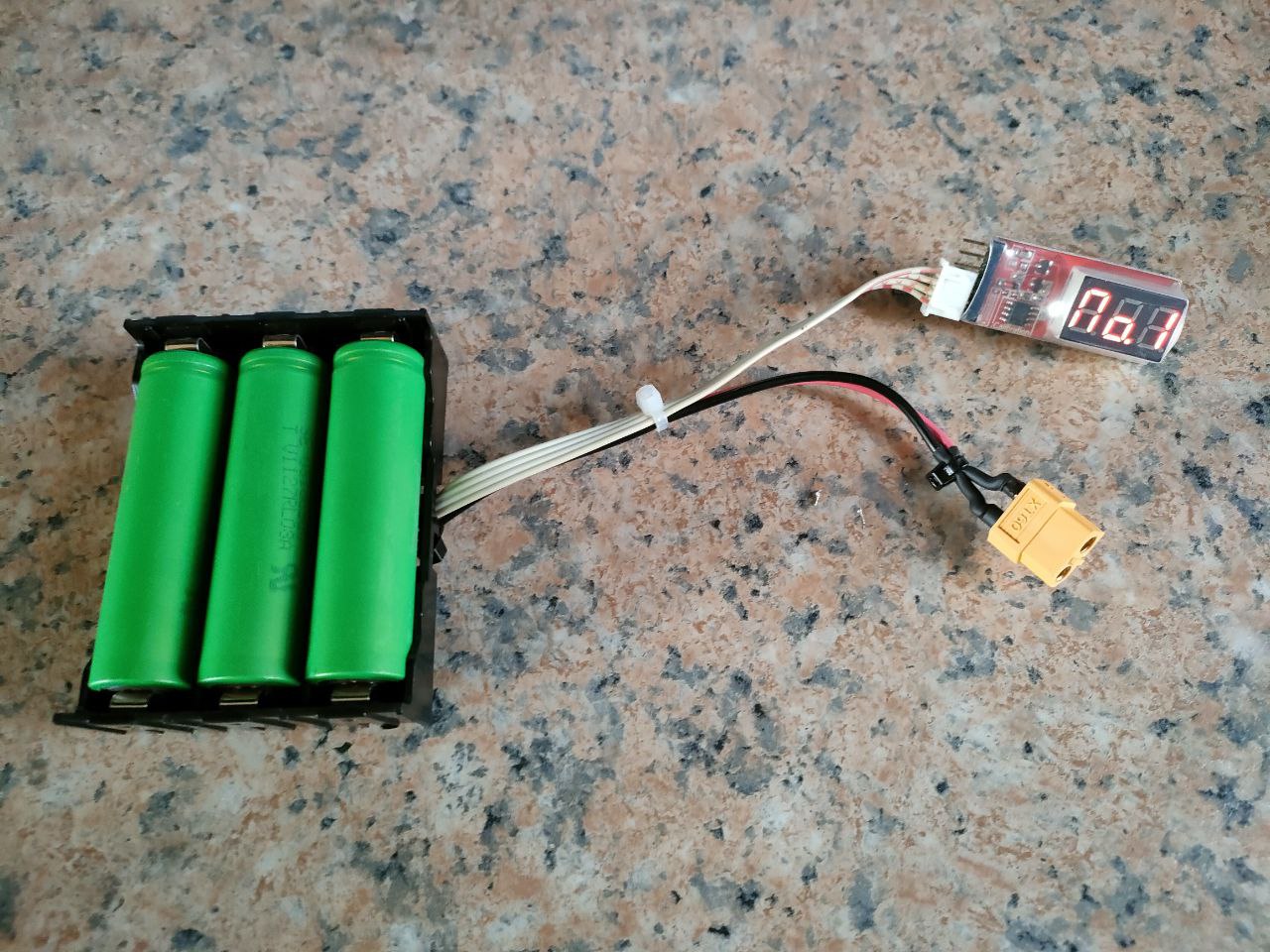
DIY External 18650 Li-ion Battery Pack for the Yaesu FT817 (Version 1)


In this posting I will describe how I built a cheap DIY 18650 Lithium-Ion battery pack for my Yaesu FT-817. I decided to go the cheap route by salvaging 3 x Laptop battery packs that was in my junk box. I tested each cell and discarded dead or bad cells. These cells were all Li-Ion batteries. The cell voltage of the batteries I used was in the 4.18v range.. So that gave me 12,6V on a 3S pack which is in the specs of most standard amateur radio transceivers. 

I used a simple tester to test each individual battery. However this is not the way to do it but I had it on hand and thus far it has worked for me. (More information on the tester can be found later in this posting) I charged each cell separately using a one cell charger as shown in the photo. Once all three batteries were charged to within specs I used a 18650 holder instead of solder directly to the batteries which is not a good idea. There after I soldered the wires to the connectors and wires as shown in the images and schematic diagram. I did not use a Battery Management System (BMS) as I own a balancing charger. I only added a power lead for charging and a balancing lead.

The charger is depicted in the photos below. I decided to build this battery pack as simple as possible with very little bells and whistles. Thus far it works flawlessly with the FT817. This pack can also be used for a variety of other power sources. You can either add a power up converter or a down converter for the voltage that you need.

I decided to build a lightweight, low cost and KISS power pack for the FT817 but also to be used in other projects. I still have several 18650 batteries in the junk box and will construct a larger capacity battery bank for the FT817 in future. 

The total cost of the project did not exceed +- R60.00 having used salvaged batteries, junk wire and balancer lead from the junk box. The items that made up the total cost was the heatshrink, XT60 connector and the 18650 case.

Finally:  When using the battery pack with the Yaesu FT817 I will add the  Lithium Battery Low Voltage Alarm Indicator to the balancing lead to monitor the full (All)  battery voltage and also individual No 1-3 cell voltages.  Update to follow in a future post once the pack is tested  fully.

(Click on images for larger view)


Above:  Single cell 18650 USB Li-ion Battery Charger

Above:  Battery Tester 2S-6S RC Lipo Li-ion Lithium Battery Low Voltage Alarm Indicator Meter Checker Tester Red LED Digital Display 2-6S Voltage Tester.

Specification:

Used for 2S-6S(7.4V~22.2V)Li-Po /Li-ion/LiMn/Li-Fe Battery

Voltage detection precision:±0.01V

Unit voltage display range: 0.5V-4.5V

Total voltage display range:0.5-27V

Pins distance: 2.54mm

0.36 inches digital display

Voltage Display unit is \”v\”

Display \”NO.1/2/3/4/5/6\” is the number of battery cell

Display \”ALL\” this is total battery voltage.

The use of programmable memory for calibration of the voltage measurement accuracy

Test the working state of lithium battery.

Compatible for 2-6S Lipo/ Li-ion/ LiMn/ Li-Fe battery

Color: red

Size:4.8×1.8×0.8cm

Net weight:7g


Closure of this ZS Link Network Blog - 29 April 2026

This will be the final posting on the ZS Link Network Blog. This blog will no longer be updated but will remain available for research an...